
Spotting Fake OnlyFans Profiles: Checks Before You Follow
Before you follow any free OnlyFans page, a few quick checks can save you time and protect your payment details. Fake profiles are common on free pages because there is no subscription barrier, so anyone can create a page that mimics a real creator.

This guide walks through a practical verification routine. It covers bio errors, image reuse, cross-platform links, activity patterns, and the message requests that signal a scam.
A free page is simply a page where the subscription price is set to $0. The creator earns through pay-per-view messages and tips instead.
Why fake profiles target free pages
Paid pages carry a small hurdle: a payment method and a subscription fee. Free pages remove both.
Impersonation usually follows one of two patterns. The first is a duplicate of a known creator, using the same photos and a slightly altered display name.
Both patterns rely on the same gap. OnlyFans has no built-in discovery feed or directory, so readers often arrive from social posts, comment threads, or external lists.
Warning: a follow is free, but the messages that arrive afterwards are not. Treat every unsolicited payment request on a new free page as unverified until you have checked the profile against the creator’s other public accounts.
Run these steps in order before you follow a page you found through a link:
- Open the profile and read the bio line by line.
- Compare the profile photo against the creator’s public accounts elsewhere.
- Reverse-search two or three of the posted images.
- Check whether the listed outside links resolve to real pages.
- Review posting times and how the account replies to comments or messages.
- Wait before sending any payment, even a tip.

Bio inconsistencies to check first
The bio is the cheapest part of a profile to fake, and it is also where fakes slip up most often. Real creators tend to keep their bio stable and specific. Copies drift.
Look for text that reads like a template. Phrases about daily content or exclusive chats appear across thousands of pages and tell you nothing about the person behind the account.
Broken or mismatched links are a stronger signal. If the bio points to a social handle that does not exist, or to a handle belonging to someone else, stop there.
- Generic description text that could apply to any account
- Same wording pasted across several profiles you have already seen
- Outside links that lead to dead pages or redirect to unrelated sites
- Display name that differs slightly from the creator’s known handle
- Bio updated very recently on an account claiming years of activity
- No location, no schedule, and no contact method at all
None of these points proves a page is fake on its own. Two or three together, however, justify moving on.

Image reuse and reverse checks
Images are the most reliable evidence. Most fakes do not produce original photos, so they recycle. Save two or three posts and run each through a reverse image search.
If the same picture appears on stock libraries, on unrelated social accounts, or on a different creator’s page, the profile is not what it claims to be. Pay attention to image quality as well. Reposts often show compression artefacts or cropped watermarks.
Consistency matters too. Real pages show a person in the same settings, with the same lighting and the same equipment, across months. Fakes mix styles because the images come from different sources.
While you verify, it also helps to know what a legitimate paid page would cost, so you can spot a scam asking for something unusual:
- Minimum paid subscription: $4.99 per month
- Maximum paid subscription: $49.99 per month
- Typical paid range: $4.99 to $15 per month
- Common average: $5 to $10 per month
- No base price exists below $4.99; only promotional first months may dip lower
- Platform fee: 20% on subscriptions, tips, and pay-per-view; the creator keeps 80%
If a free page asks for a payment outside these norms, that is a separate warning sign.

Social link and cross-platform verification
A real creator usually has a public presence that predates the page. The links in the bio should lead to accounts that have history, followers, and posts matching the page’s content style.
Fakes either list no outside links or list links that go nowhere useful. Sometimes they point to a freshly made account with a handful of posts and no engagement.
Follow the links yourself rather than trusting the preview. Check whether the account name matches, whether the posting history is older than the OnlyFans page, and whether the two accounts reference each other.
| Check | Real creator’s links | Fake profile’s links |
|---|---|---|
| Account age | Older than the page, with regular posts | New, often created in the same week |
| Handle match | Same name across platforms | Minor spelling differences |
| Engagement | Replies and comments from real users | Empty comment sections |
| Cross-references | Each account points to the others | No mutual links at all |
| Content style | Consistent across platforms | Mixed or borrowed images |
A page that fails two or more of these rows is worth skipping. For a starting point, best onlyfans equipment collects free pages.

Activity patterns that give fakes away
Timing is harder to fake than images. Real creators post on a rhythm that matches their stated schedule. Fakes often dump a batch of posts at once, then go quiet for days.
Odd hours can also be a signal, particularly when the posting times cluster around a timezone that contradicts the bio. A page claiming to be based in one country but posting only during another region’s working hours deserves a second look.
Replies matter. On a genuine free page, the creator or a manager usually responds to comments and messages at some point. A page that never replies, or replies only with payment requests, is not behaving like a normal account.
- Do not follow based on a single viral post alone
- Do not assume a verified-looking display name means verification
- Do not send a tip before checking the profile’s history
- Do not trust screenshots of earnings or subscriber counts
- Do not move to another app at the first request

Red flags in messages and requests
The message inbox is where most scams become obvious. A new follower on a free page may receive a pay-per-view message within minutes. That alone is normal, since pay-per-view is how free pages earn.
What is not normal is pressure. Urgent requests to pay quickly, claims of a limited slot, or demands to continue the conversation elsewhere are classic patterns.
Off-platform payment requests are the clearest red flag. The platform takes 20% on subscriptions, tips, and pay-per-view, and creators keep 80%. A profile that asks you to pay outside that system is avoiding both the fee and the protection.
- Messages demanding immediate payment to keep access
- Requests to pay through a gift card, bank transfer, or crypto
- Links to chat apps that have no connection to the page
- Rushed signup prompts asking for personal details
- Offers that promise something in exchange for a fee upfront
- Accounts that delete and repost the same message repeatedly
If access has already been paid for, remember that raising a subscription price stops auto-renew, and existing access lasts until the current paid period ends. That rule protects you from surprise charges, but it does not recover money already sent to a scam.
Reporting a fake page
Once you are confident a profile is fake, report it rather than simply unfollowing. Reports help the platform remove the account and reduce the chance that other readers follow it.
Gather evidence before you submit anything. Screenshots of the profile, the bio, the outside links, and any payment requests are all useful. Include the exact handle and the date you observed each item.
If the page impersonates a known creator, the original creator’s account is the strongest reference point. Note both handles in your report and explain the specific overlap, such as copied images or a near-identical display name.
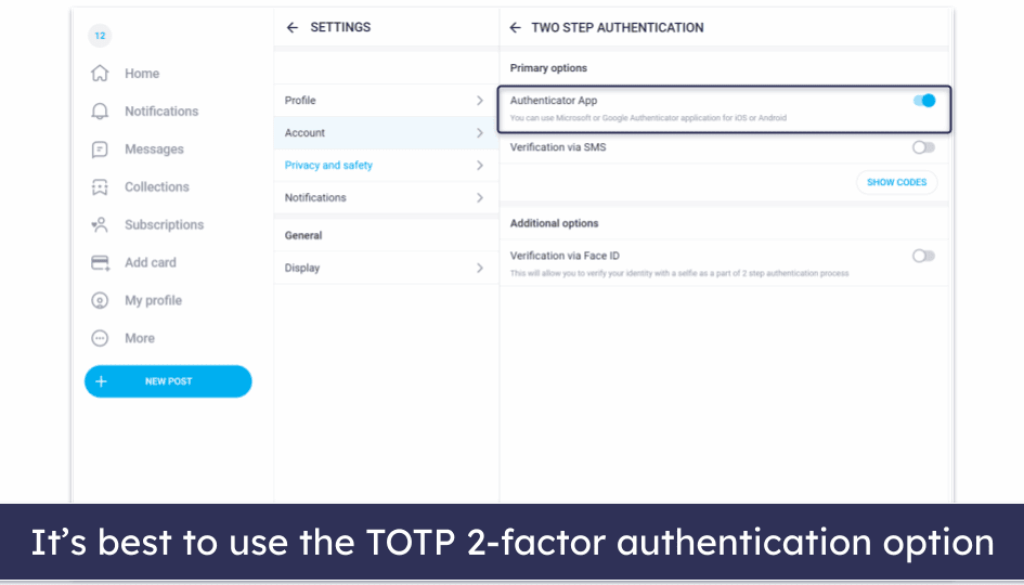
Setting up two-step authentication on your own account is also worth doing while you are at it. Keeping your login secure limits what a fake can do if it ever gains access to your details.
If you are building a paid setup of your own later, guides such as this overview of best onlyfans equipment cover the basics. Verification habits still matter more than gear.
A ten-minute pre-follow checklist
Most of the checks above take under ten minutes in total. Run them before you follow, tip, or subscribe to anything, and the odds of landing on a fake drop sharply.
Ranking sites exist precisely because the platform has no discovery feed. That makes third-party lists useful, but it also means a listing is not proof. Verify each page on its own.
| Step | What to check | Time |
|---|---|---|
| Bio | Generic text, broken links, handle mismatch | 1 minute |
| Images | Reverse-search two or three posts | 3 minutes |
| Outside links | Account age, engagement, cross-references | 2 minutes |
| Activity | Posting rhythm, reply behaviour | 2 minutes |
| Messages | Payment pressure, off-platform asks | 2 minutes |
BestOnlyFans style directories can point you toward pages worth a look, but the checks remain yours to run. A few minutes of verification is cheaper than a lost payment.
Keep the routine consistent. The same six checks work on every free page you encounter, and they take less time each time you repeat them. Readers who verify consistently report fewer bad follows and fewer unwanted payment requests.
BestOnlyFans listings and similar directories are starting points, not verdicts. Treat every profile as unverified until your own checks pass.
Fakes rely on speed and impulse. Slowing down for ten minutes is the single most effective countermeasure available to you. BestOnlyFans refreshes its rankings every month.
FAQ
Can a free OnlyFans page still be legitimate?
Yes. Free pages set the price to $0 and earn through pay-per-view messages and tips, which is a normal model.
Is there any subscription price below $4.99?
No base price sits below $4.99. Only promotional first months may dip below that figure.
What happens to my access if a creator raises the price?
Auto-renew stops, and your existing access lasts until the current paid period ends.
Why do ranking sites exist for OnlyFans pages?
The platform has no built-in discovery feed or directory, so external lists fill that gap.